
AI can make writing faster, but sometimes the result has a familiar “AI-written” feel. Certain words, phrases, and sentence patterns Tools show up again and again in generated content. AI Writing Tell Scanner is designed to spot those patterns and make them easier to fix.
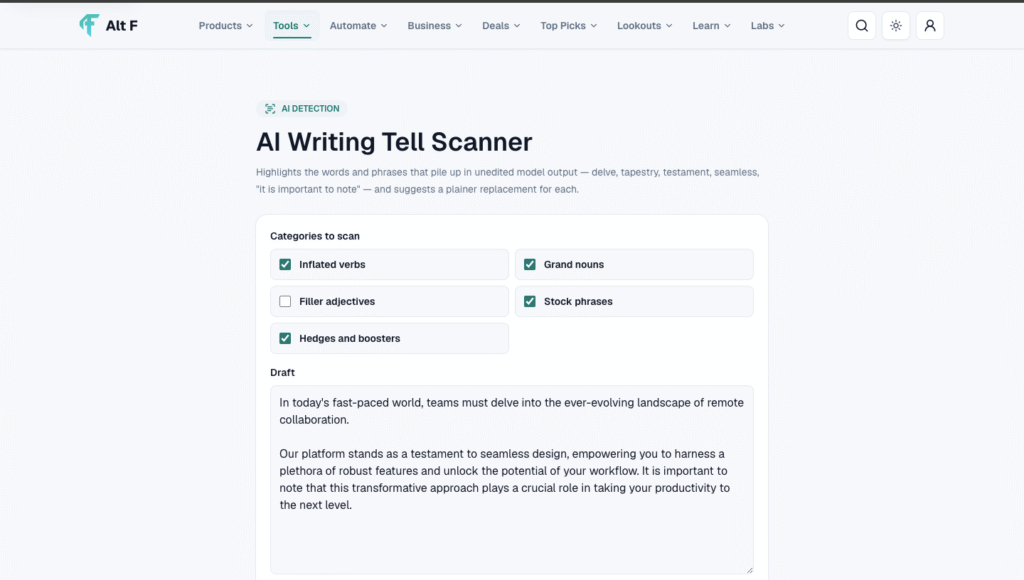
Instead of completely rewriting your content, the scanner focuses on the small details that can make writing sound unnatural. It highlights words and phrases that frequently pile up in unedited AI output, such as “delve,” “tapestry,” “testament,” “seamless,” and phrases like “it is important to note.” It then suggests simpler, more natural alternatives.
What Does AI Writing Tell Scanner?
The idea is simple: find the phrases that make your writing sound overly polished, repetitive, or generic.
For example, imagine a sentence like:
“Let’s delve into the seamless tapestry of modern technology.”
It sounds polished, but it may also feel unnecessarily formal. A simpler version could be:
“Let’s look at how modern technology works.”
The meaning stays almost the same, but the second sentence feels more direct and conversational.
That is where the AI Writing Tell Scanner can be useful. It draws attention to these commonly repeated expressions so you can decide whether they actually belong in your writing.
Common AI Writing Tells It Can Highlight
Some words aren’t bad on their own. The problem is overuse.
Words such as:
- Delve
- Tapestry
- Testament
- Seamless
- Moreover
- Furthermore
- Multifaceted
- Transformative
- In today’s world
- It is important to note
- A testament to
- Delve deeper
- At the heart of
- In conclusion
can sometimes make an article feel formulaic when they appear repeatedly.
The scanner helps bring these phrases to your attention instead of silently changing your writing.
Why Does This Matter?
When someone reads a blog post, product description, social media caption, or article, they usually want the information to be clear.
If every paragraph is packed with formal expressions, the content can start feeling distant.
Good writing doesn’t necessarily need complicated vocabulary.
Compare these two examples:
Before:
“Furthermore, this innovative solution provides a seamless experience for users seeking to delve deeper into their productivity goals.”
After:
“This tool also makes it easier to manage your productivity.”
The second version is shorter, but more importantly, it sounds like something a person might actually say.
How the Scanner Helps
The tool follows a straightforward process.
1. Add your writing
Paste the content you want to check into the scanner.
2. Scan for common tells
The tool looks for words and phrases that frequently appear in unedited AI-generated writing.
3. Review the highlights
Potentially repetitive or AI-like expressions are highlighted so you can spot them quickly.
4. Check the suggested replacement
The scanner recommends a simpler alternative where appropriate.
5. Make the final decision yourself
You don’t have to accept every suggestion. If a highlighted word fits your sentence and your writing style, keep it.
This last step is important. A word isn’t automatically bad just because an AI model uses it.
AI Writing Tell Scanner Isn’t a Magic “AI Detector”

One thing to keep in mind is that identifying common AI-style language isn’t the same as proving that a piece of content was written by AI.
A human writer can use the word “seamless.” An AI can produce a sentence without using any of the commonly flagged words. So these patterns should be treated as editing signals, not definitive evidence.
The real value of the scanner is helping writers make their content sound more natural and less predictable.
Why Simpler Writing Often Works Better
Think about the way people normally communicate.
You probably wouldn’t tell a friend, “It is important to note that this restaurant provides a seamless culinary experience.” You’d simply say, “The food and service are really good.”
That doesn’t mean every piece of professional writing should sound casual. Different audiences need different tones. A technical report, academic paper, landing page, and personal blog shouldn’t all sound identical.
The goal is not to remove sophisticated language.
The goal is to remove unnecessary language.
A Useful Editing Example
Suppose your original paragraph says:
“In today’s rapidly evolving digital landscape, businesses must delve into innovative strategies to seamlessly transform their customer experience. Moreover, this approach serves as a testament to the importance of technology.”
The scanner might flag phrases such as “rapidly evolving digital landscape,” “delve into,” “seamlessly,” “moreover,” and “serves as a testament.”

A more natural rewrite could be:
“As technology changes, businesses need practical ways to improve the customer experience. The right tools can make that process easier and more effective.”
The second version doesn’t try to sound impressive. It simply gets to the point.
Who Can Use AI Writing Tell Scanner?
The tool can be useful for almost anyone who regularly works with AI-assisted writing, including:
Bloggers:
Clean up AI-assisted drafts before publishing them.
Content writers:
Make articles feel more natural without rewriting everything from scratch.
Marketers:
Remove generic phrases from advertisements, landing pages, and campaigns.
Students:
Review AI-assisted drafts and improve clarity and readability.
Social media creators:
Make captions and posts sound less formal and more conversational.
Businesses:
Create clearer website copy, emails, guides, and product descriptions.
The Best Way to Use It
Don’t use the scanner with the goal of making every sentence “less AI.”
Instead, use it as an editing assistant.If the answer is no, replace it.

Read the highlighted phrase and ask yourself:
- Would I normally use this word?
- Does this sentence sound like something a real person would say?
- Is the phrase adding meaning or just making the sentence longer?
- Can I explain the same idea more simply?
- Does this wording match my audience?
If the answer is yes, leave it alone.
AI Writing Tell Scanner is essentially a second pair of eyes for AI-assisted writing. It helps you notice the small words and phrases that can make otherwise useful content feel repetitive or overly polished.
The biggest benefit isn’t simply replacing words like “delve” or “seamless.” It’s learning to recognize when your writing is trying too hard to sound sophisticated.
Clear writing usually wins.
Say what you mean. Use the words that fit your voice. Cut the unnecessary phrases. And when AI helps you create the first draft, take a few minutes to make the final version sound like you.
FAQ’S
1. What are AI writing tools?
AI writing tools use artificial intelligence to help create, edit, rewrite, and improve written content.
2. What are the best AI writing tools in 2026?
Popular options include ChatGPT, Jasper, Grammarly, Copy.ai, and Writesonic, depending on your writing needs.
3. Can AI writing tools help with SEO content?
Yes. Many AI writing tools can help with keyword ideas, outlines, headings, meta descriptions, and SEO-friendly content.
4. Are AI writing tools free?
Some offer free plans or limited features, while advanced features usually require a paid subscription.
5. Can AI writing tools replace human writers?
AI tools can speed up writing and assist with ideas, but human creativity, fact-checking, editing, and judgment are still important.