

If you’ve ever wished you had a personal assistant who handles your busywork, keeps your tasks organized, and helps you move faster at work, AI can do exactly that. The best part is that you don’t need to be a tech expert. With the right tools and habits, you can boost your productivity starting today.
Below are practical, easy-to-use AI hacks that genuinely save time and make your workflow smoother.
1. Let AI Handle Your Routine Tasks
Most people lose hours every week on repetitive work like formatting documents, creating summaries, updating sheets, or responding to basic emails. AI tools can take over these small, time-consuming tasks so you can focus on the work that actually matters.
Try this:
- Use AI assistants (like ChatGPT, Notion AI, or Gemini) to summarize long reports.
- Ask AI to format information into tables, checklists, or templates.
- Generate quick drafts for emails, messages, and presentations.
Even saving 10–15 minutes per task adds up to hours saved each week.
2. Use AI for Faster Writing and Editing

Whether you write blog posts, social media captions, emails, or reports, AI can help you work faster without losing your personal writing style.
How to apply this:
- Draft your first version with AI and then refine it yourself.
- Use AI to check grammar, tone, and clarity.
- Ask AI to rewrite text in a simpler or more professional style.
It’s like having a 24/7 editor who keeps your writing sharp.
3. Turn Raw Ideas Into Structured Plans
If brainstorming or organizing ideas takes you too long, AI can help you transform scattered thoughts into clear, actionable plans.
Useful for:
- Project outlines
- Blog outlines
- Marketing strategies
- Video scripts
- Course structures
You just share your idea, and AI shapes it into a clean, ready-to-follow plan. This alone can save hours when starting something new.
4. Automate Your Daily Schedules
Managing tasks, deadlines, or meetings manually is tiring. AI-powered productivity apps can create schedules, break down tasks, and remind you before you forget.
Tools to explore:
- Motion
- Sunsama
- Notion AI
- Todoist with AI
- ClickUp AI
These tools help you plan your day with realistic timelines and reduce the stress of juggling multiple priorities.
5. Speed Up Research With AI
Instead of reading dozens of articles or watching long videos, AI can scan information and give you clear answers in seconds.
What you can do:
- Ask AI to compare tools, services, or products.
- Use AI to get quick summaries of YouTube videos.
- Ask for step-by-step guides on anything you’re learning.
- Let AI break down complex topics into simple explanations.
This hack alone can cut research time in half.
6. Use AI to Automate Social Media Work

Content creators and businesses can save massive amounts of time by letting AI handle the heavy lifting.
Examples:
- Generate captions in your brand voice.
- Batch-create ideas for reels, posts, or stories.
- Use AI tools for auto-scheduling and auto-publishing.
- Analyze hashtags and target audiences.
This helps you stay consistent without burning out.
7. Train AI to Work Like Your Personal Assistant
AI becomes more powerful when it understands your preferences. You can train most AI tools by giving them examples of:
- Your writing style
- The type of content you like
- Your work goals and schedule
- Preferred formats (bullet points, short paragraphs, tables, etc.)
The more context you give, the better the output becomes. With time, AI feels less like a tool and more like part of your team.
8. Use AI to Improve Your Decision-Making
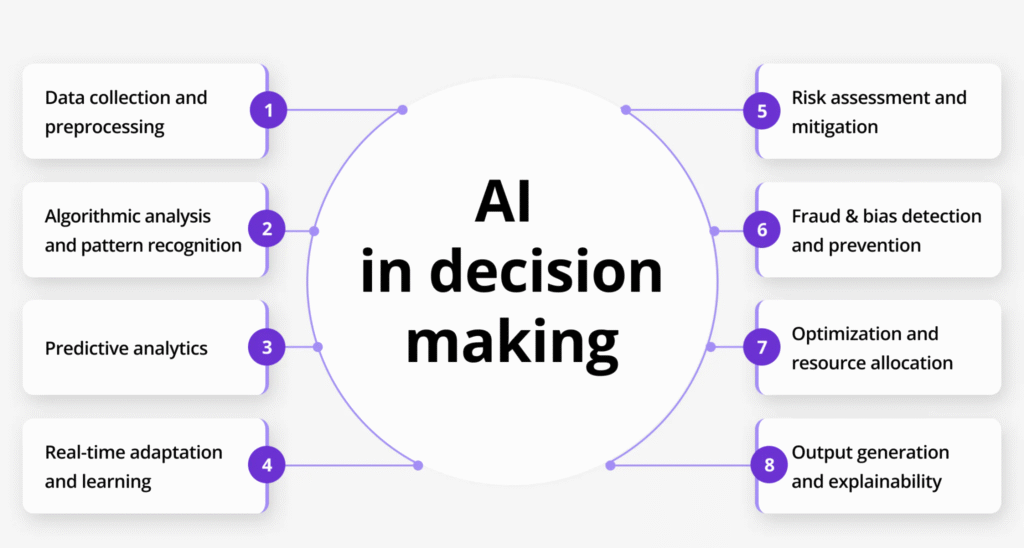
Whenever you’re stuck between multiple options, AI can evaluate pros and cons, compare choices, and highlight risks you may miss.
Try this:
- Compare job offers.
- Compare software tools.
- Evaluate business ideas.
- Check if a decision aligns with your long-term goal.
It’s like having a strategic advisor who helps you think clearly.
Final Thoughts
AI isn’t here to replace your work. It’s here to make you more efficient, organized, and confident with your tasks. The key is to start small—try one or two hacks this week and see how much time you save.
Once you get used to working with AI, you’ll wonder how you ever managed without it.
The information in this blog is for general educational and informational purposes only. While every effort has been made to provide accurate and up-to-date content, AI tools and productivity methods may vary in effectiveness for different users. Always review tool features and settings before use, and make decisions based on your own needs and judgment. The author is not responsible for any outcomes resulting from the use of the tools or techniques mentioned in this article.
#AIProductivity #ArtificialIntelligence #ProductivityHacksProductivityHacks #WorkSmarter #Anslation #Carrerbook #AITools #DigitalWorkflow #TechTips #AutomationTools #AIForWork #EfficiencyBoost #FutureOfWork #TechTrends